Skip to content
CardBenchBY SMARTFACT

FREE BIN & RACK CARDS

Bin label generator: a scannable label for every bin

Updated

A bin label generator makes labels for parts bins and storage locations: clear text for people, and a barcode that scans as one exact value. CardBench makes them free in your browser as 100 × 50 mm cards with Code 128 or QR, with no account.

Free to use. No account, email address or trial. Cards are made in your browser.

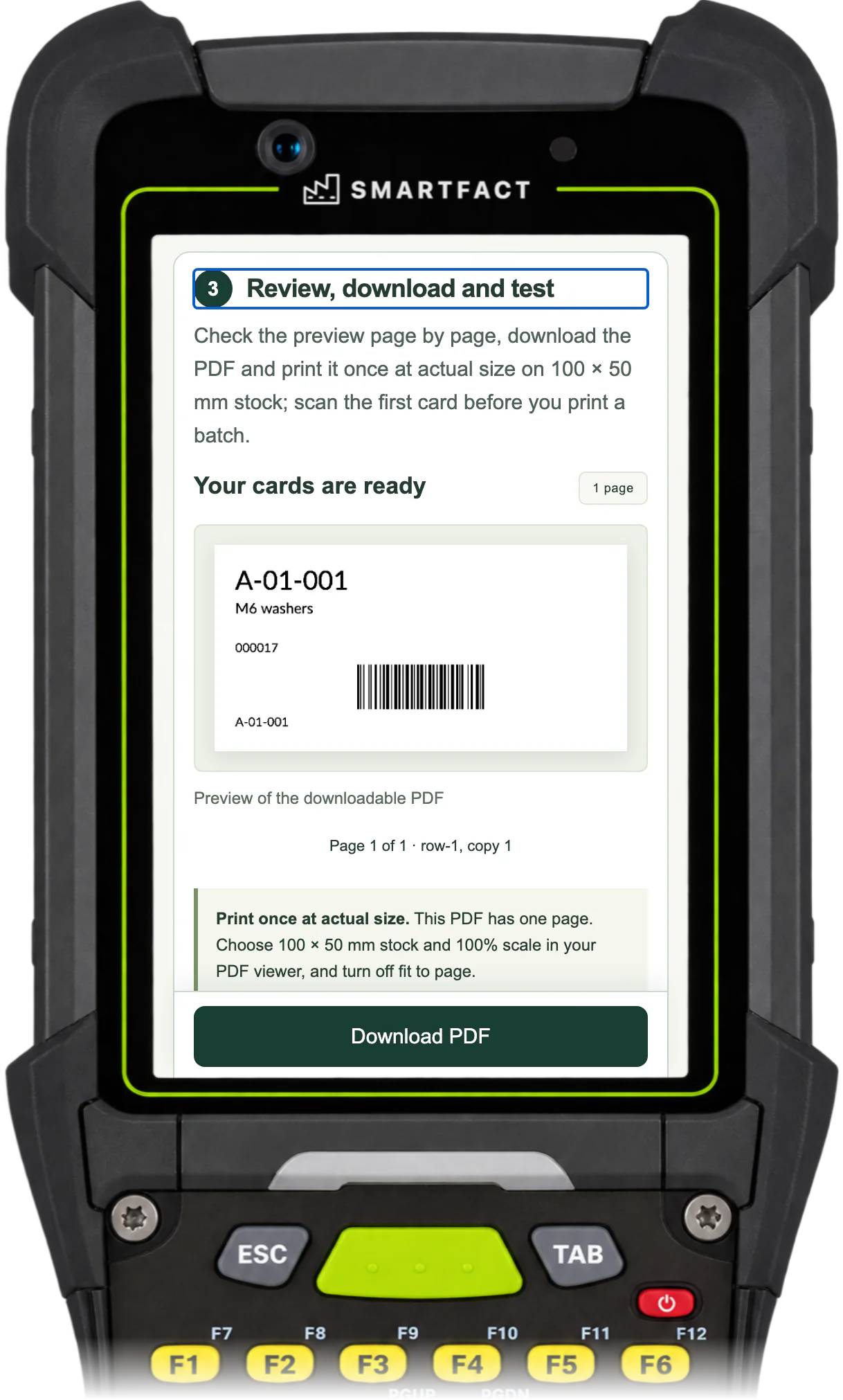
CardBench preview of the generated PDF: one bin card with its location, description and barcode
The checked card, previewed as the actual PDF on a phone, handheld or scan station.
Bin label generator · 5:18 · Watch on YouTube

How do I make a bin label?

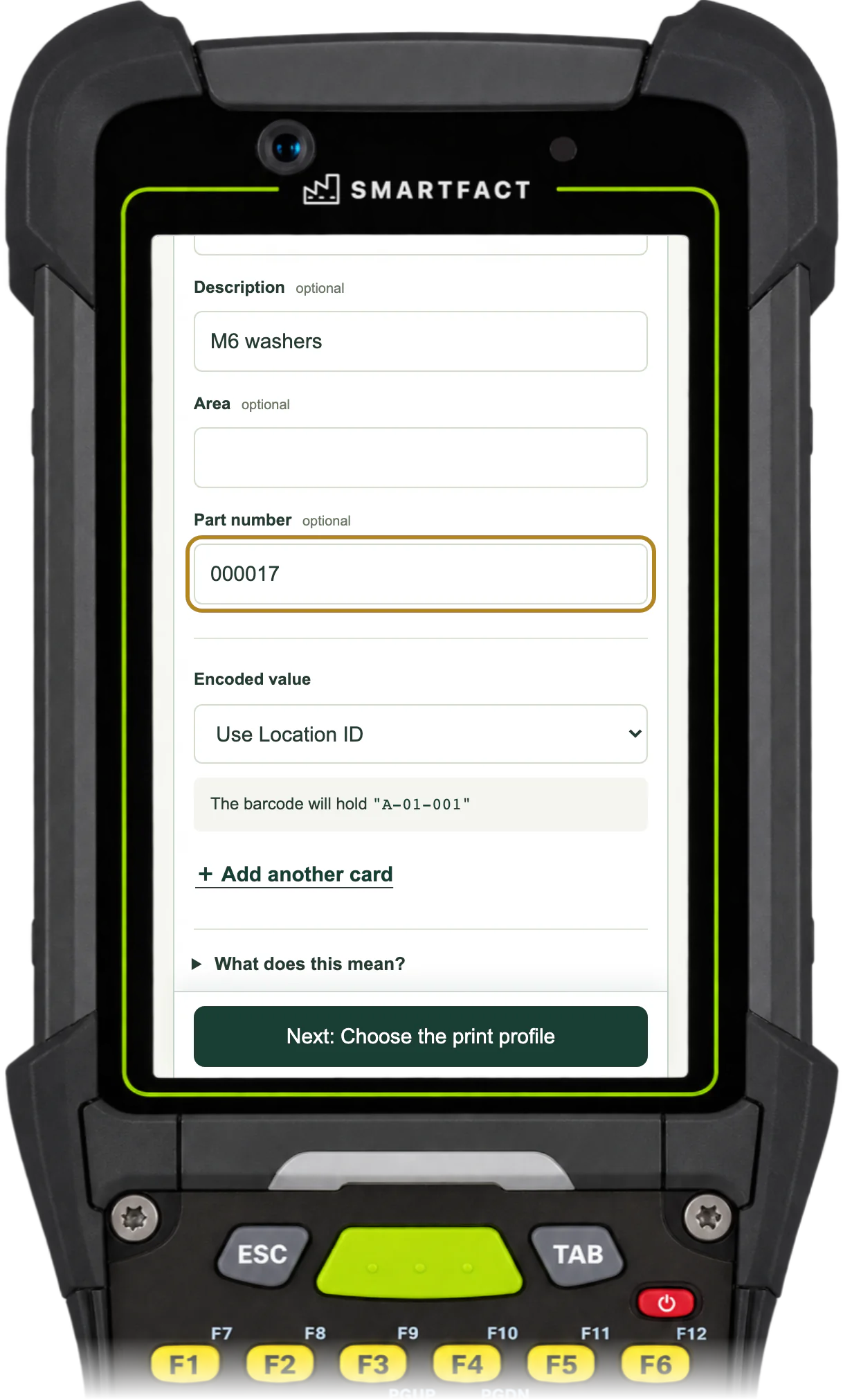
Choose Make bin cards and type the bin's location ID, such as A-01-001: by default, the barcode holds exactly that value. Add a short description and, if you like, a part number, which keeps any leading zeroes. Then choose your label printer's resolution, 203 or 300 DPI, the barcode type and the number of copies. CardBench checks that everything fits and makes the PDF in your browser.

CardBench card details with the description M6 washers, part number 000017 and the barcode holding the location ID
The part number is printed text; the barcode still holds the location.

Code 128 or QR?

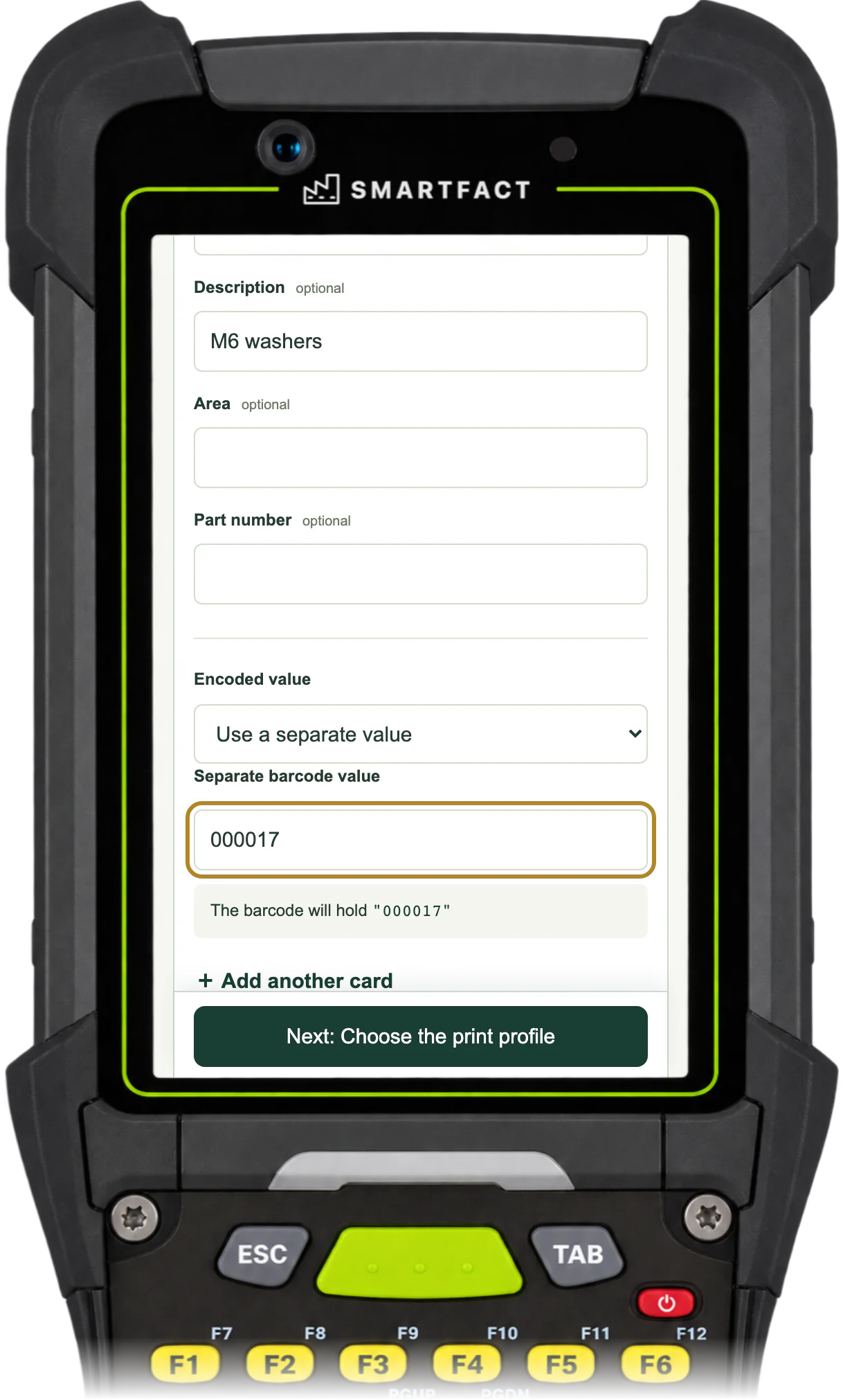
Code 128 is a line barcode that ordinary keyboard scanners read. It suits plain letters, numbers and punctuation, from 1 to 64 characters. QR is a square code for values up to 128 characters, and needs a scanner that reads 2D codes. Either way, the barcode can hold the location ID or a separate value you choose, such as 000017, while the card still shows the readable location.

CardBench card details with Use a separate value chosen and 000017 as the barcode value
The scanned value and the printed location are separate choices.

What if the barcode does not fit?

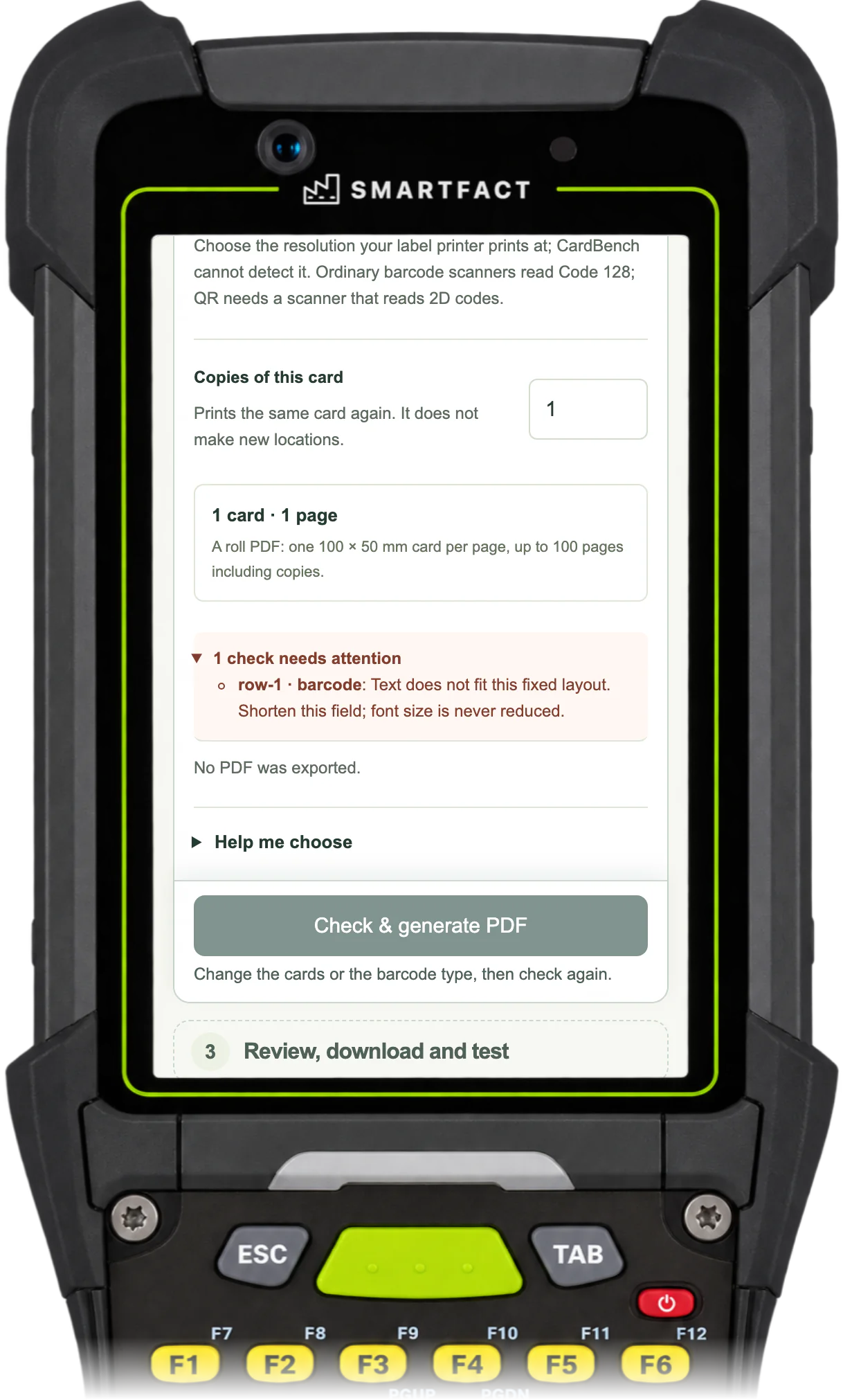
The card has a fixed layout, and CardBench checks the text and barcode against it before making the PDF. A value too wide for the Code 128 area is refused and no PDF is exported: the barcode is never shrunk and its data is never changed. Shorten the value, or try QR.

CardBench refusing a barcode value that is too wide for the card, with no PDF exported
A value that does not fit is refused, never shrunk.

Can I make a batch from a list?

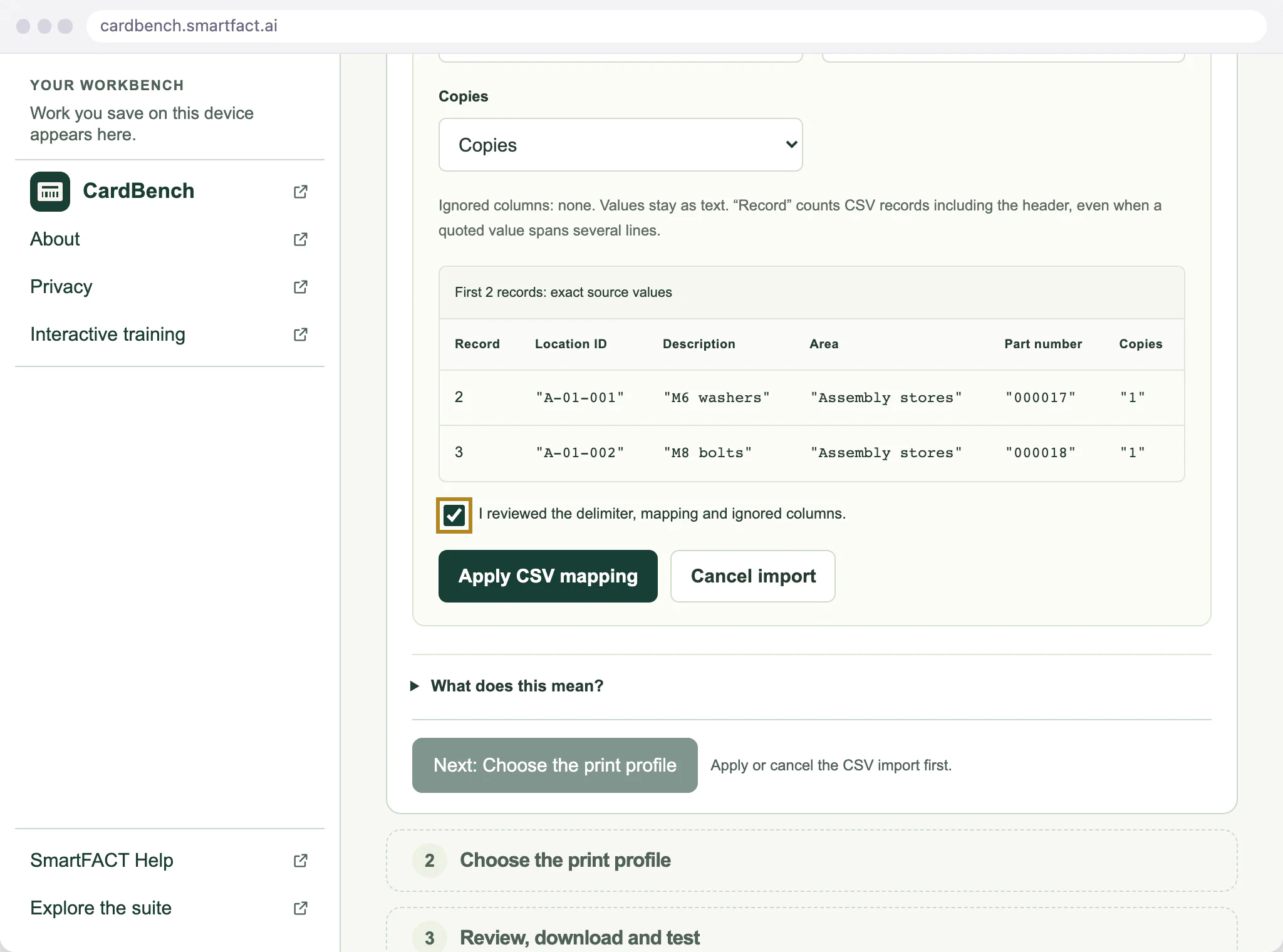
Yes. Import a UTF-8 CSV of up to 1,000 records, map its columns to the card fields and review the mapping before applying it. Each record can have its own number of copies, from 1 to 100, and one PDF holds up to 100 pages. The CSV to barcode bin cards page walks through it.

CardBench CSV import preview showing the first two records under their mapped card fields, with the review box ticked
A CSV mapping, reviewed before it replaces the working batch.

What CardBench does not do

CardBench makes one fixed card, 100 × 50 mm, with one card on each PDF page. It does not make A4 or Letter sheets of labels, other sizes or custom layouts. It is not an inventory system: stock quantities, movements and replenishment stay in your existing system, and nothing is written back to it. Printers and scanners vary, so print and scan one card before a batch.

WHO IT IS FOR

For small factories, workshops and stores teams putting consistent identification on parts bins and storage locations.

WHY USE IT

Keep the visible label and encoded value deliberate

CardBench uses a fixed bin-card layout. Enter the text people need to read and choose the exact value your scanner should return. These can be different. The app preserves identifiers rather than turning them into numbers or guessing the intended payload.

HOW IT WORKS

CardBench in three steps.

  1. 01

    Enter the location and value

    Start with a synthetic or known location. Keep leading zeroes if they belong to the identifier. Choose Code 128 for supported ASCII values or QR for UTF-8 payloads.

  2. 02

    Check the card

    Choose 203 or 300 DPI and the required copies. Resolve reported layout or character errors. Content is not silently clipped or shrunk to make a failing card fit.

  3. 03

    Review, download and test

    Generate the PDF and inspect its preview. Print one physical card at 100 × 50 mm and actual size, then scan it before producing a batch. Save a project file if you want to edit the cards again.

A CONCRETE EXAMPLE

Readable to a person, exact for a scanner

A display label such as Aisle A / Rack 03 can accompany the encoded value A-03-0017. Keeping those fields separate lets the card explain the location without changing the identifier used by your factory software. The app does not write that identifier back to another system.

USED IN PRODUCTION

When bin cards are part of a production workflow.

CardBench makes fixed bin and rack cards. Two SmartFACT services take the same identifiers further. KitProof is in early access and LabelRules starts with an invited trial, with scope agreed with you for each.

Free tier

KitProof

Kit checks that know your bins. KitProof can export a bin card for every component in a kit configuration as a CardBench project file. Where the configuration declares that a bin scan is acceptable for a component, the KitProof station accepts a scan of its card and records it as a bin scan rather than a part scan.

Free tier

LabelRules

When you need more than a fixed bin card. LabelRules is for production label workflows: approved rules select each job’s layout, resolve customer codes and check required values before printing. Custom layouts are assessed with you during the invited trial.

BEFORE YOU START

Common questions.

Is the bin label maker free?

Yes. CardBench needs no account. Records and PDF generation stay in your browser.

Can I print a sheet of labels on A4?

No. The PDF contains one 100 × 50 mm card per page, for matching stock printed at actual size. CardBench does not make A4 or Letter sheets.

Does it manage stock in the bin?

No. It creates identification cards. Inventory quantities, stock movements and replenishment workflows remain in your existing system.

What are the current limits?

CardBench makes bin and rack cards only: one fixed 100 × 50 mm layout, one card per PDF page, at 203 or 300 DPI, in Code 128 or QR. It does not make A4 or Letter sheets, other card types or custom layouts, and it is not an inventory system, replenishment workflow or general label designer. A PDF holds up to 100 pages including copies. Imports are UTF-8 CSV or CardBench project files of up to 2 MiB and 1,000 records, and text is limited to Latin characters, accents and selected punctuation; emoji and CJK characters are refused. Printers and scanners vary, so print and scan one physical card before a batch.

What happens to my data?

Entered records, imported CSV and projects are processed locally in browser memory. No accounts, uploads or automatic storage of working data are used. Download a project to keep editable work; reloading loses unsaved changes. Hosting may log ordinary asset requests. The app loads its own renderer assets; it is not an installed offline app. Google Analytics is optional and loads only after you accept. Use Analytics settings to change your choice. Analytics cookies and the stored consent choice are separate from your working data; see /privacy/.

FREE TO USE

Put CardBench to work.

Open the free tool and start with one known example.

Make your first bin card →

THE SMARTFACT SUITE

SmartFACT services
and free tools.

Automate factory decisions with rules you describe in plain English. Explore focused SmartFACT services, plus free tools for everyday checks. The free tools need no account.

Free tierSuggested next step

KitProof

Turn plain English component rules into automatic kit checklists, then check scans against the expected parts and quantities.

Explore KitProof ↗
Free tier

LabelRules

Describe label rules in plain English. Automatically select layouts, resolve customer codes and check each job before printing.

Explore LabelRules ↗
Free tier

WorkSteps

Turn plain English rules into automatic step selection for each unit, with required evidence and a record of completed work.

Explore WorkSteps ↗
Free tier

FactorySpec

Apply approved product rules and calculations automatically to turn dimensions and options into manufacturing requirements.

Register early-access interest ↗
Free tier

SmartFACT Data

Maintain reference tables with ConfigSheets or bring shop orders into SmartFACT through reviewed connectors. Check changes and deliver data to the products that use it.

Explore SmartFACT Data ↗
Early access

ParcelOffice

Scan the work order and the parcel choice to book the courier and print the labels. Approved plain English rules recommend or choose the parcel.

Explore ParcelOffice ↗
Free tier

RefillFlow

Scan an empty container to send the right refill request to stores. Approved plain English rules set the stores queue, priority, ticket printer and escalation.

Explore RefillFlow ↗
Free tier

RemnantRack

Label each offcut, find a suitable length before cutting new stock and record what you used. Approved plain English rules decide what to keep and where it goes.

Explore RemnantRack ↗
Free tier

ToolCustody

Check a shared tool before handover, record who has it and keep damaged or overdue tools out of the next issue. Start free with one crib.

Explore ToolCustody ↗
Free tier

StoresFlow

Receive, put away, reserve and issue stores material with barcode checks, keeping held, reserved and available stock apart. Start free with one stockroom.

Explore StoresFlow ↗
Free tier

LotTrail

Follow a lot or serial number through the records your factory already keeps, with the source of each link and the gaps shown. Start free with two declared sources.

Explore LotTrail ↗
Early access

CheckStation

Scan an identified unit to get its approved final-inspection checks, then record exact readings with their result, holds and release history.

Register early-access interest ↗
Free tier

ReclaimStation

Book returned units in, recover and label the usable parts, release them independently and record the unit each goes into. Start free with one product family.

Explore ReclaimStation ↗
Free tier

SmartFACT Purchasing

Collect purchase requests, approve supplier orders and track what is still to arrive. Start free at one site.

Explore Purchasing ↗
Free tier

SmartFACT Automation

Describe, test, approve and audit the automation rules of every SmartFACT product in one place. Included with each product’s paid plan, or on its own.

Explore Automation ↗
Free tool

ScannerBench

See the text and key events your keyboard scanner sends. Compare them with the value you expected.

Test a scanner ↗
Free tool

PrintBench

Print a known PDF, measure its reference marks and compare scans from the printed codes.

Check a print ↗
Free tool

CardBench

Create 100 × 50 mm bin and rack cards with Code 128 or QR, from one record or a CSV.

You are here
Free tool

CountBench

Count stock by location with a barcode scanner, compare it with a stock file and export the results.

Start a free count ↗
Free tool

BarcodeBench

See exactly what a scanned barcode contains, with hidden characters shown and GS1 fields, check digits and dates explained.

Inspect a barcode ↗
Free tool

MatchBench

Scan a reference and each label, see an exact match or the first difference, and download the results.

Start a free comparison ↗
Free tool

TagBench

Scan an item or location, note what needs attention, print a review tag and keep a review list.

Make a free tag ↗
Free tool

FindBench

Load your own parts and locations CSV, scan a code and see every location it lists.

Start a free lookup ↗
Free tool

ManifestBench

Check cartons, pallets or serial numbers against a list with a phone or scanner and see what is missing.

Start a free check ↗
Free tool

FeedBench

Check CSV and JSON files exactly as written, preview a column mapping and compare two versions by key.

Check a file free ↗
Free tool

CycleBench

Time work cycles and changeovers on a phone, record interruptions with reasons and download the results.

Start a free study ↗
Free tool

OffcutBench

Label the offcuts on your rack, find a piece long enough before cutting new stock and record what you used.

Track offcuts free ↗
Free tool

TraceBench

Load one or two CSV exports and follow a lot or serial forwards or backwards, with the row behind every link.

Start a free trace ↗
Free tool

ReclaimBench

Record the parts recovered from each return, label them with a QR code, check them and record the unit each one goes into.

Track recovered parts free ↗
Free tool

GuidBench

Generate GUIDs, UUID v4 and v7, ULIDs and Nano IDs, format and download batches, or inspect a UUID in your browser.

Generate identifiers ↗
Free tool

OctetBench

Inspect and edit text, hex, Base64 and binary bytes in your browser, reveal hidden characters and compare byte sequences.

Inspect some bytes ↗
Free tool

PatternBench

Test JavaScript regular expressions in your browser, inspect matches and captures, preview replacements and check expected cases.

Test a pattern ↗
Help

SmartFACT Help

Step-by-step guides and interactive demonstrations for the SmartFACT suite. Read the instructions, watch a task or practise with real product screens and sample data.

Open SmartFACT Help ↗